Scoped

The businesses beating you aren’t smarter. They’re organized.

Scoped is CRM and project management for service businesses. Keep customers, quoted amounts, and jobs connected in one shared workspace for your team and the AI assistants you choose to connect.

  • Free for 3 people
  • 30-day Pro trial, no card
  • Bring your data

One day in Scoped, for a business like yours.

Pick your industry. This illustrative demo follows a lead to Won, the project you confirm with the customer attached, and an update from a connected AI assistant.

Choose your business

Construction & trades, illustrated: a new lead lands on the board, the kitchen remodel quote moves to Won, Scoped creates the project with the customer and quote attached, and an AI assistant posts an update recorded under the person who authorized it.

The shop that answers first wins the job. Then it keeps the customer.

Nobody down the road is working harder than you. The busy ones just stopped running the business on memory.

Answer first

The shop down the road, today

A homeowner calls at noon. By two, the office has her history open and the callback is on the board.

You, next Tuesday

The voicemail is on your board before you’re off the ladder. Your answer goes out while she’s still deciding.

Deliver what you promised

The shop down the road, today

The crew opens the job on a phone and already knows which tile the customer picked.

You, next Tuesday

The won quote is the job: customer attached, every phase owned, Saturday’s change already on it.

Keep the customer

The shop down the road, today

Last year’s customer calls about the basement. They start from the history, not from scratch.

You, next Tuesday

The gate code, the June job, the note about the dog. One page, one click, before the second ring.

Four things. One record.

Clients, the pipeline, projects, and your AI assistant share the same customer history, so nothing is retyped between them.

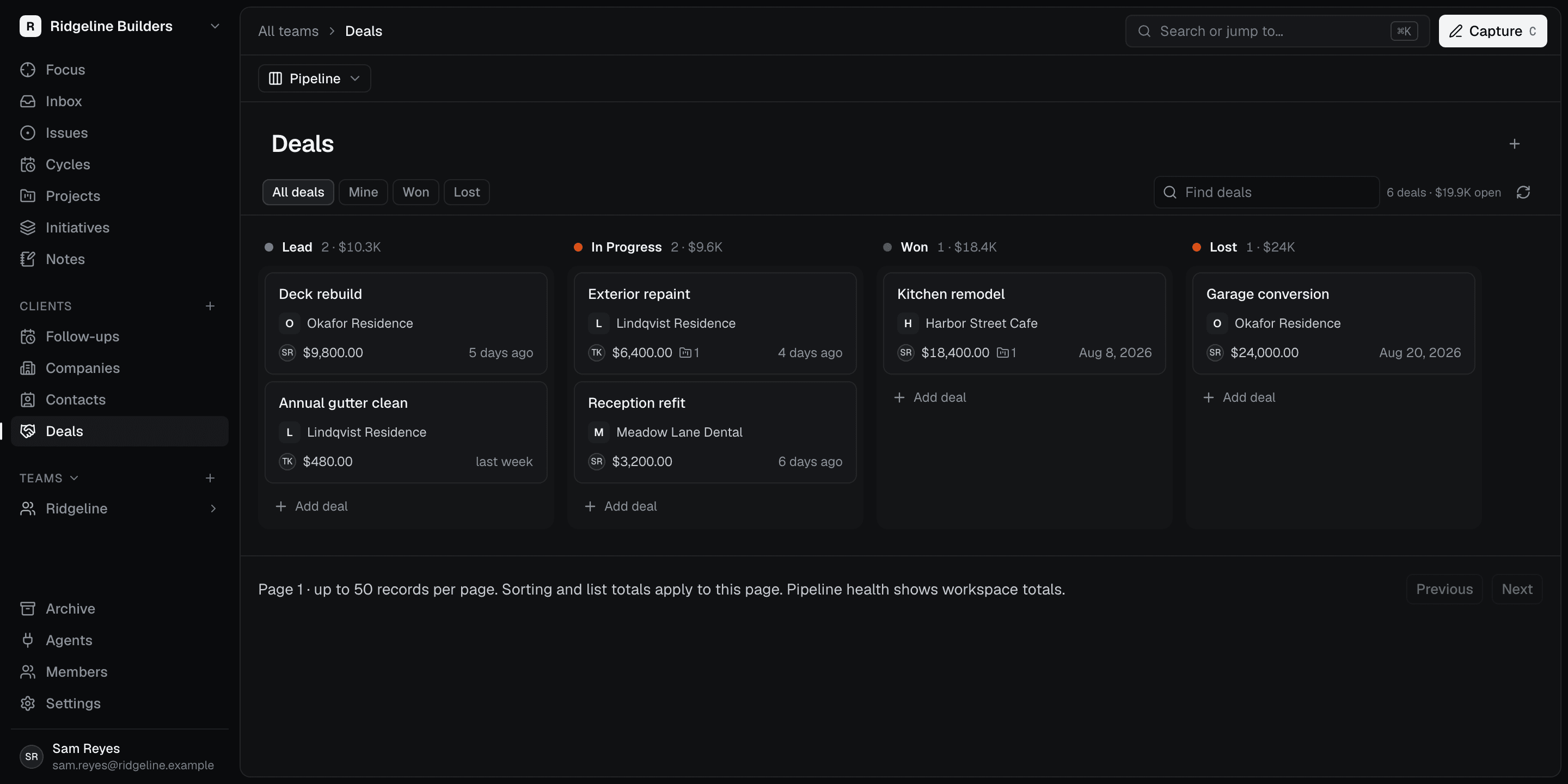
PipelineA board with stages you name, and the quoted amount on every card, so you can see what’s out and what’s gone quiet.When the customer says yes, move the deal to Won in the pipeline and review the offered project with the customer already linked. Nothing is copied between tools, because there was never a second tool.See the pipeline ClientsEvery customer on one page: contacts, the notes you’ve starred, every quote, every job.Move a quote to another customer and the linked jobs follow. Archive a job and the history stays for the day they call back.See Clients Projects & initiativesBreak the job down the way you already run it. Every phase has an owner and a status.Focus shows each person only what’s waiting on them. Cycles keep a two-week push moving; initiatives tie a multi-phase build together.See Projects AI assistantsConnect the assistant you already use. It works from your real customers and jobs.You choose what it can see and change. Every update is recorded under the person who authorized it, and you can revoke access anytime. Scoped doesn’t run the AI.See AI assistants

Your AI tools are capable. They just don’t know your jobs.

Connect the assistant you already use. It reads your real customers and jobs, posts the updates you allow, and every change is recorded under the person who authorized it. Revoke its access in Settings.

A shared thread, from context to progress
Example workspace

An example: Sam asks an assistant to catch up on the kitchen remodel. The assistant reads HSC-148, finds two tile samples still waiting on the customer, and posts the next steps to Scoped under Sam’s authorization. Tariq sees the update in the issue’s activity and takes the callback.

Tools come and go. Your customer history stays.

Scoped Cloud

In your browser, on any device, on a managed database. Nothing for you to run.

Scoped Connect

The desktop app that keeps your records on a database you control. Free, with unlimited records and assistants. Coming soon.

Export anytime

Your whole workspace, whenever you want it. No ticket, no waiting on anyone.

Bring your data

Import projects, issues, and cycles from a supported CSV export when you start, with a note of anything that didn’t come across.

Two commands to connect.

Built on MCP. Works with Claude Code, Codex, and other MCP clients, with OAuth to one workspace and tools limited to what you approve.

Developer docs
Add Scoped to Codex
codex mcp add scoped --url https://app.scoped.ai/mcp
codex mcp login scoped

Start with the work you have today.

A shared customer record is useful when the people selling the work also need to see it delivered.

What do I set up first?

Create a Cloud workspace, invite your team, add a customer, and record a live opportunity on the pipeline. Then add the work you are delivering. You can start in your browser and connect an assistant later. Follow the workspace setup guide.

How does a sale become a project?

Changing a deal to Won in the pipeline or All deals table offers a project with details filled in. You review and confirm its creation, then add the work and owners. The project keeps its customer and deal links. Use the sales-to-project handoff checklist to carry the promises into delivery.

How do I decide whether Scoped fits?

Start with the handoff your business needs: customer history, sales follow-up, delivery ownership, and team access. Compare those needs with your estimating, invoicing, and scheduling tools in our CRM and project management buying guide, then check the workspace plans.

The practical details.

Scoped is intentionally focused. Here is exactly what it does today, and what it leaves to the tools you already have.

Visit the Help Center
Do I need to be technical to use Scoped?

No. If you can drag a card across a board, you can run Scoped. Connecting an AI assistant is optional, and the setup is guided when you decide you want one.

Does Scoped keep track of my customers?

Yes. Every company and contact gets a page with notes, quotes, jobs, and a dated activity feed. Quotes move across a board with stages you name, and when you win one, Scoped offers to start the job with the customer’s details already filled in. The job stays linked to the customer and the quote.

Does Scoped run my AI assistant?

No. Scoped does not run your agents. You bring the assistant you already use; it runs in its own tool and works from your Scoped record under the permissions you grant. Every change it makes is recorded with the authorizing person and connection source, and you can revoke its access at any time.

Where is my business data kept?

Scoped Cloud keeps it in a managed PostgreSQL database, so there is nothing for you to run. Scoped Connect, the desktop app that keeps your records on a database you control, is coming soon. When you connect an outside assistant, the information it retrieves may also be processed by that assistant’s model provider.

Can I take my records with me?

Yes. Export your whole workspace whenever you want it. Finished jobs are archived rather than deleted, so the history is still there when a customer calls back, and you can bring existing projects and issues over from a supported CSV export when you start.

Does Scoped send quotes or invoices?

No. Scoped tracks your customers, the quoted amounts, and the work you deliver. It does not generate or send quotes, collect signatures, invoice customers, or take payments. Many businesses keep their estimating or invoicing tool and use Scoped as the customer and job record.

The shop that remembersgets the callback.

The person who called. The detail that shaped the quote. The job that followed. Give all of it a home you can open in ten seconds.

Start freeSee the handoff

The person who called. The detail that shaped the quote. The job that followed.

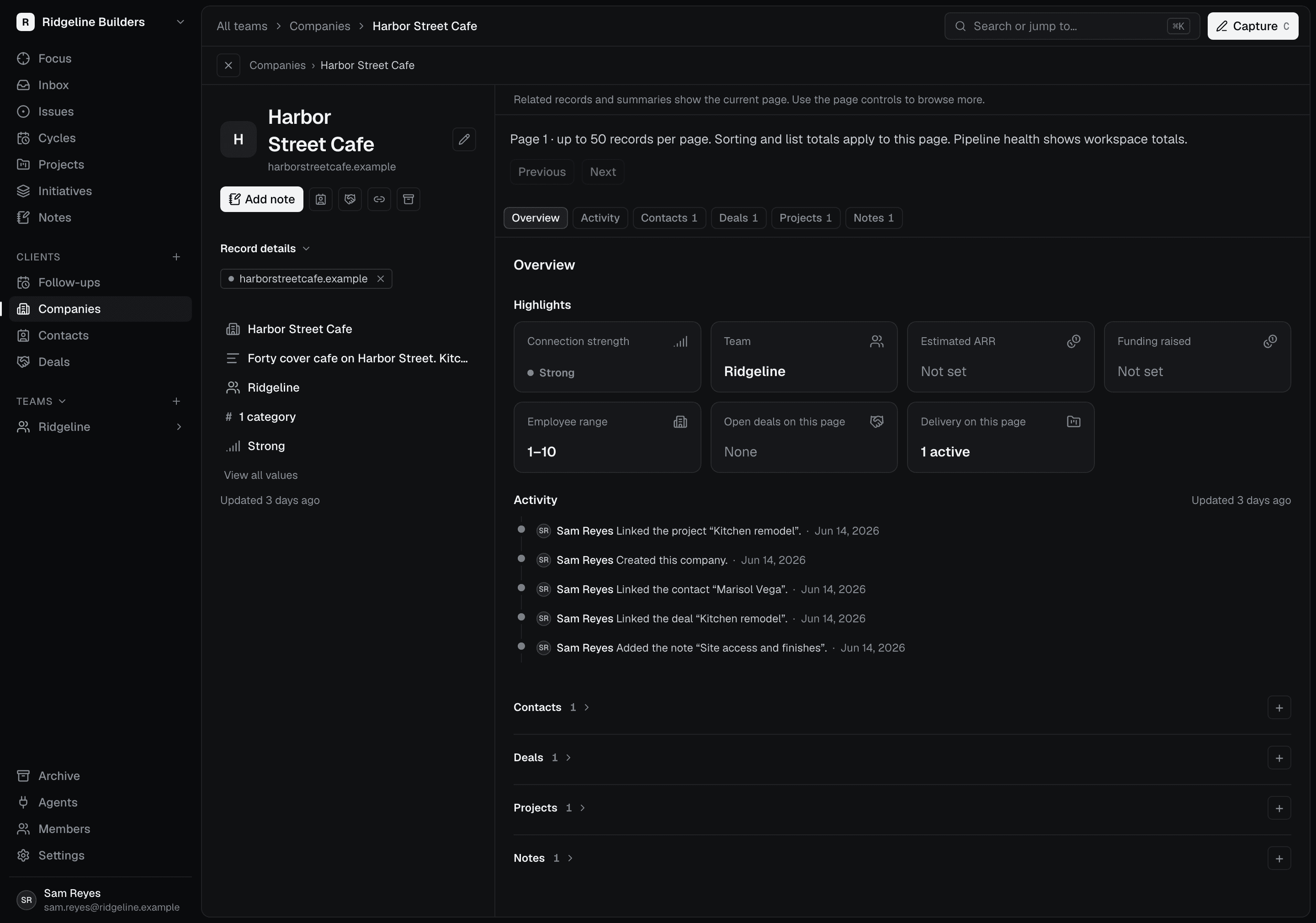
A company record in Scoped: the contact, the won deal, the linked job and the notes for Harbor Street Cafe.

A company page with context.

Open a customer to see activity, contacts, deals, projects, and notes together. Pick up the relationship without digging through texts, voicemail, and a notebook.

Remember what matters.

Capture notes against a customer and link them to a project when useful. Favorite the details you come back to, from the gate code to the quote they asked about last spring.

Keep the work connected.

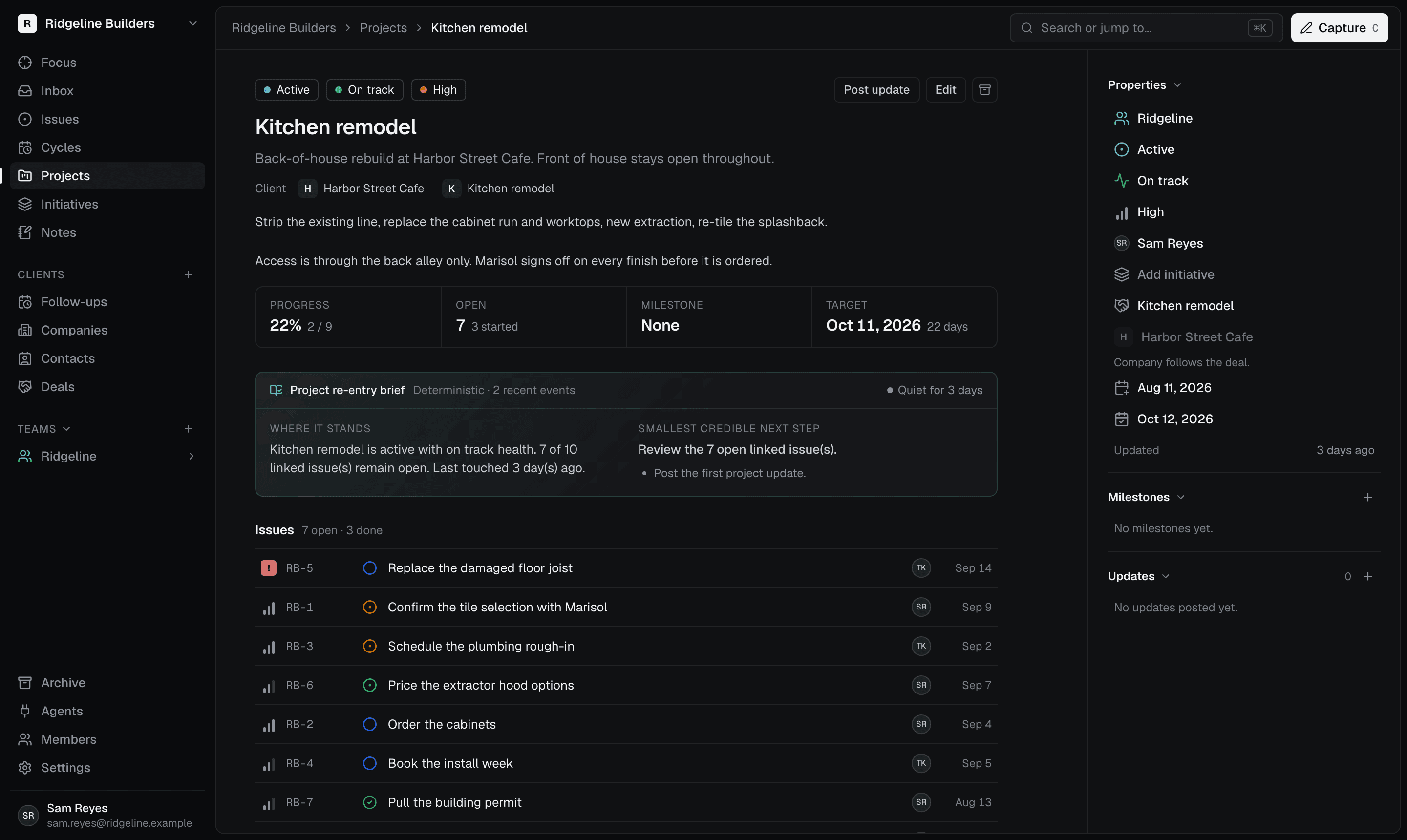
Projects show their company and deal. Move a deal to a different company and its linked projects follow, so the record stays right when plans change.

Deal to project
A kitchen remodel project in Scoped, with its issues, owners and activity.

Be ready for the next call.

A relationship with Harbor Street Cafe, from the first quote to a repeat customer.

Create Harbor Street Cafe and add your contact, Marisol.

Keep the walkthrough notes and the lighting quote with the company.

Open the same page months later to check the last job before quoting the patio.

Somebody already answered first today. Tomorrow, make it you.

Start with today’s customers, the quotes that are out, and the stages you already say out loud.

Free for three people. Your first workspace gets 30 days of Pro, no card.